Put your catalogue on your own site#
mechawallet hosts a page for your offers at /s/<your-slug>. That is a
listing, and a listing on someone else's domain is not how an agent finds you.
The domain an agent already has a reason to visit is yours. This is how you make that domain say what it sells.
Paste one block#
Dashboard → Your website → Copy, or:
mw embed
You get a block like this:
<script type="application/ld+json">
{"@context":"https://schema.org","@type":"ItemList", …}
</script>
<section id="mechawallet-offers">
  <h2>Buy from Acme</h2>
  <ul>
    <li><a href="https://api.mechawallet.com/c/chk_…">Company financials</a> — $0.10</li>
  </ul>
  <p><small>Payable by AI agents over x402.</small></p>
</section>
Paste it anywhere in your page body. No JavaScript and no stylesheet — that is deliberate, and it is the whole reason this works. Crawlers and agents fetching a URL do not run a browser; anything that needs JS to render is invisible to them.
It also degrades to plain text, so it stays useful in a reader, an email, or a terminal.
Also serve a .well-known file#
mw embed --well-known > .well-known/mechawallet
{
  "mechawallet": "1.0",
  "seller": "acme",
  "offers": "https://api.mechawallet.com/v1/sellers/acme/offers",
  "payments": ["x402"]
}
Serve it at https://your-domain/.well-known/mechawallet. An agent that probes
the convention now finds your catalogue without parsing a single page.
Or embed the checkout itself#
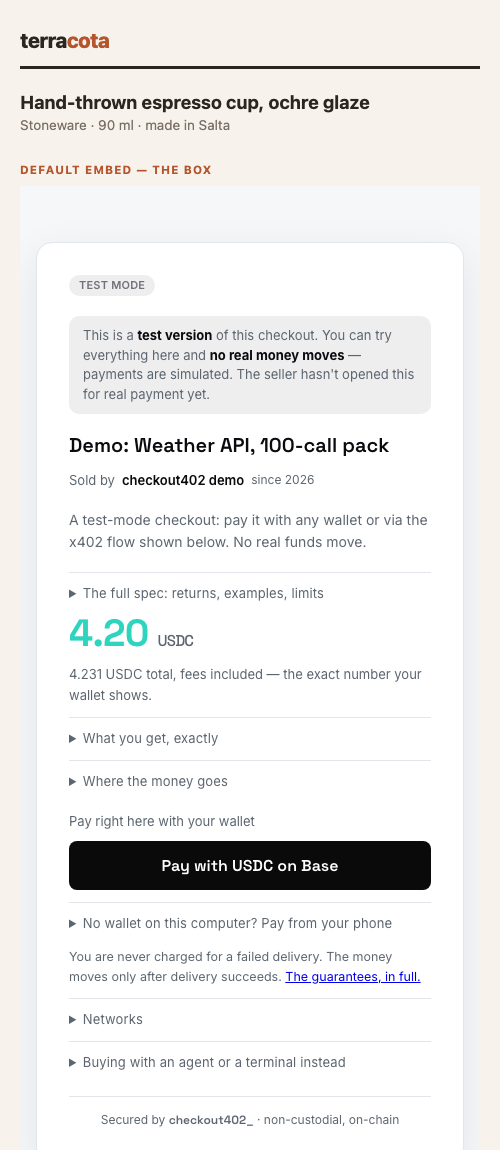
The block above links out. To sell inside your page — the buyer pays without leaving — embed the checkout:
<div data-mw="chk_abc123"></div>
<script src="https://api.mechawallet.com/static/embed.js" async></script>
Two requirements, both deliberate: create the checkout with
"wallet_button": true (that is what puts pay buttons in the frame), and
allowlist your site first (dashboard → Put it on your website, or
PUT /v1/account/embed) — nothing may frame a page carrying a money button
until its owner says who. If something is wrong the embed explains itself: a
frame that cannot work is replaced by a plain Buy → link so your buyer is
never stuck, and the exact fix prints in your browser console.
data-mw-content="cnt_…" mounts a gated article — the paid body
lives at mechawallet, your page keeps the teaser, and the reader's pass is
remembered on your own origin so they pay once rather than per article.
data-mw-price and data-mw-blurb set what the lock panel says, and
data-mw-open appears on the mount once the reader is through so your
own CSS can react.
data-mw-media gates a photo, clip or recording instead of prose:
your public preview shows with a badge, the payment panel sits under it, and
the real file replaces the preview once the reader has paid.
data-mw-kind says which of image, video or audio to build, and
data-mw-blur="6" softens the preview while it is locked — presentation
only, since the original never reaches a browser that has not paid.
If you already have subscribers, data-mw-grant is how you stop charging
them twice: your server issues a pass for a reader it has authenticated and
renders it on the mount, and the article opens with no wall and no payment.
See Pay to Read.
The frame follows YOUR page, not the visitor's OS: data-mw-theme="light"
(or dark, or auto — which reads your page's own background around the
mount) picks the palette, and data-mw-accent="#1a7f5c" puts your one
brand color on the price and highlights. Shape is yours too:
data-mw-format="flat" removes the card chrome entirely so the checkout
sits on your page's own surface, data-mw-radius="4" matches your corner
language, and data-mw-font="system" drops our faces for the visitor's
native stack.
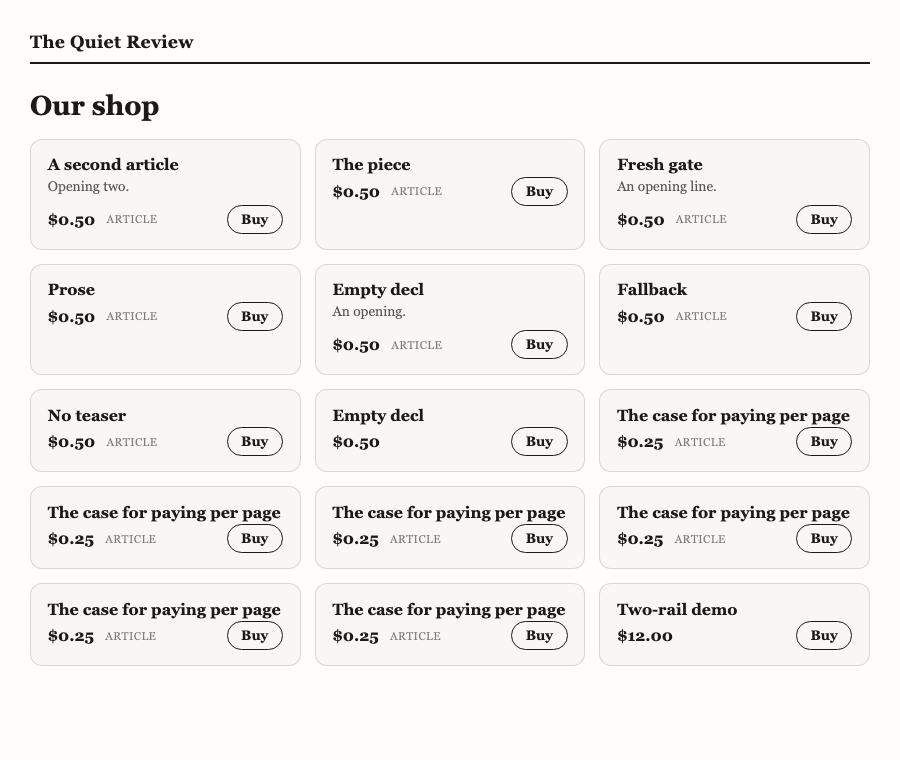
The storefront: data-mw-store#
One div for the whole shop:
<div data-mw-store="your-slug">
  <!-- the static catalogue from /v1/sellers/{slug}/embed goes here:
       it is what crawlers, agents and no-script readers see -->
</div>
<script src="https://api.mechawallet.com/static/embed.js" async></script>
Everything readable renders natively in your page — your fonts, your colours, your measure — because it is your shop window, not ours. A frame appears only when a buyer presses Buy, and that till is the ordinary checkout mount with everything it already carries: your theme and accent, the allowlist rules, and the plain Buy → link fallback when framing is not allowed. The storefront adds nothing to the money path.
The knobs compose with the ones above: data-mw-theme, data-mw-accent
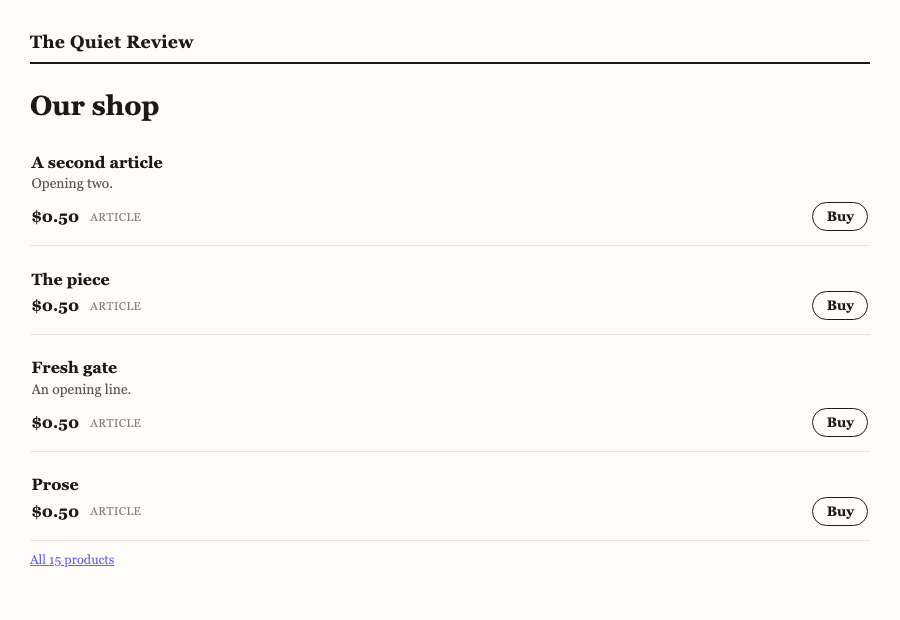
and data-mw-format="flat" (no card chrome — items become ruled rows on
your own surface), plus three of its own — data-mw-layout="grid|rows",
data-mw-limit="6" (with an "All N products" link after), and
data-mw-buy="frame|link".
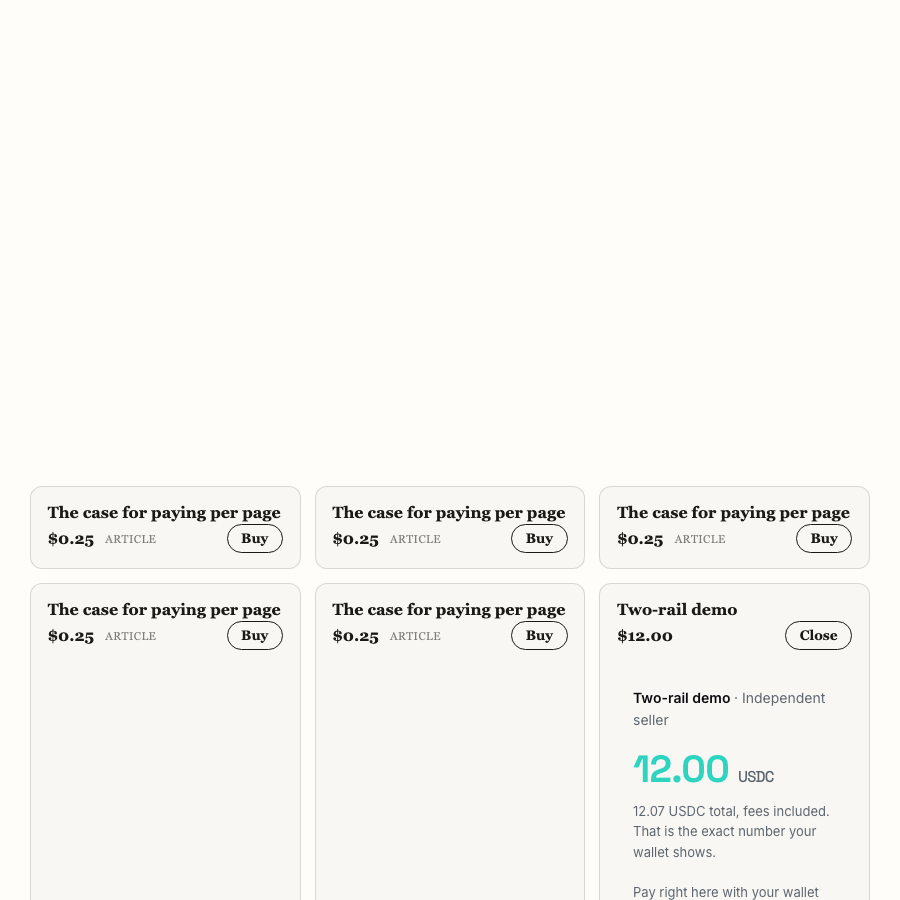
Pressing Buy opens the ordinary checkout till inside the item — price, fees-included total, wallet buttons — and Close folds it away:
format="flat" with layout="rows" and a limit turns the same mount into
ruled rows on the page's own surface:
Items say what they are: a gated article shows article, an escrow checkout escrow, a package its call count — derived from the id, which is what the id prefixes exist for. New checkouts appear on your page the moment you create them; retired ones leave. There is nothing to re-paste.
On a single-page app, call window.mwEmbed.scan() after adding mounts to
the DOM — the script scans once on load, and a mount added later waits until
you ask. Safe to call repeatedly; mounted elements are skipped.
Prefer not to hand-edit attributes: the dashboard's Your website section has a configurator — layout, style, theme, accent, limit, buy behaviour — with a live preview running this exact script against your real catalogue, and the snippet it writes is the one you copy.
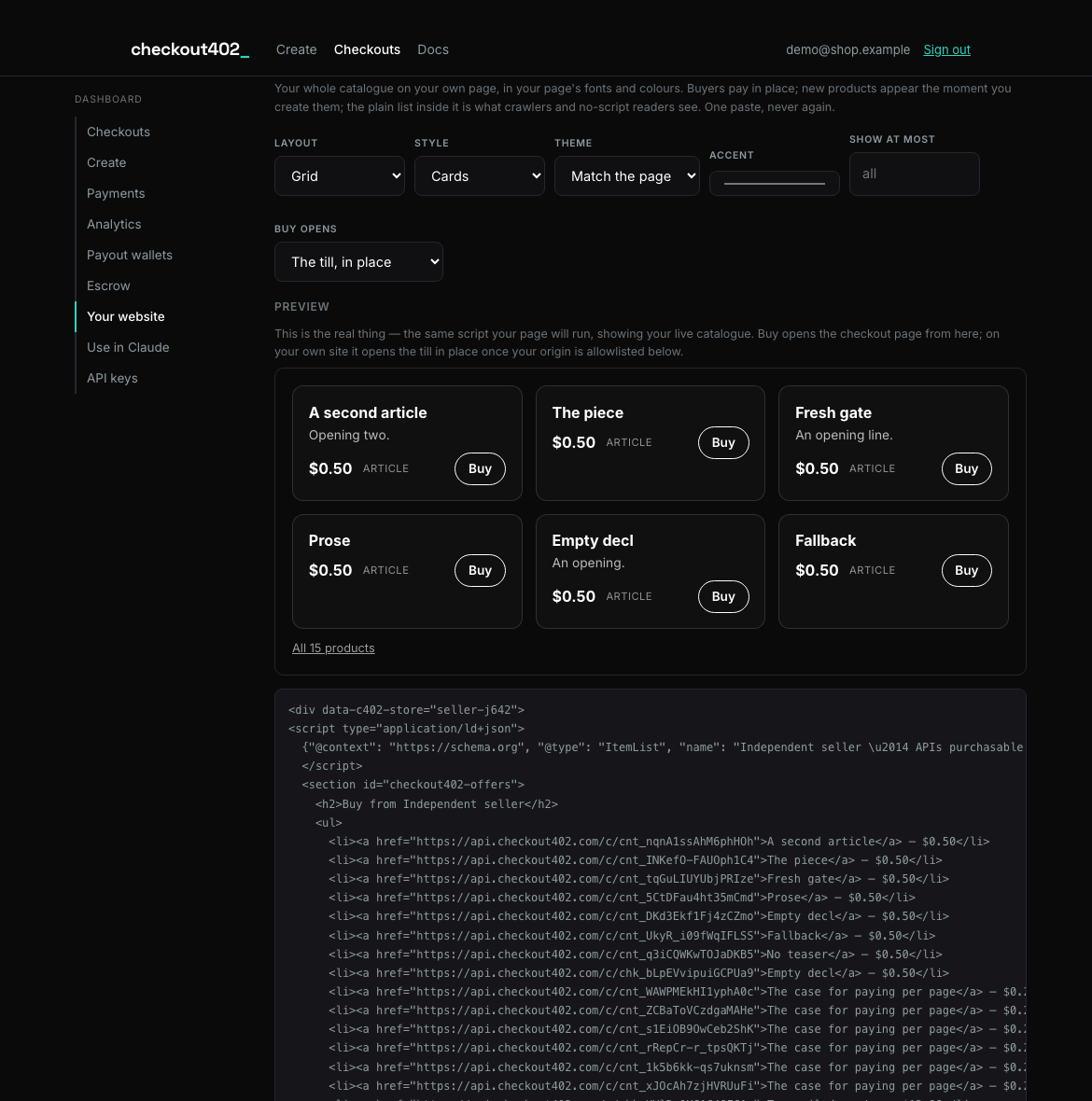
GET /v1/sellers/{slug}/embed returns the block ready to paste as store,
with the static catalogue already inside the div. If the live fetch ever
fails, the mount leaves that fallback alone: degraded is a plain list with
working links, never a blank hole.
Composing surfaces: data-mw-part#
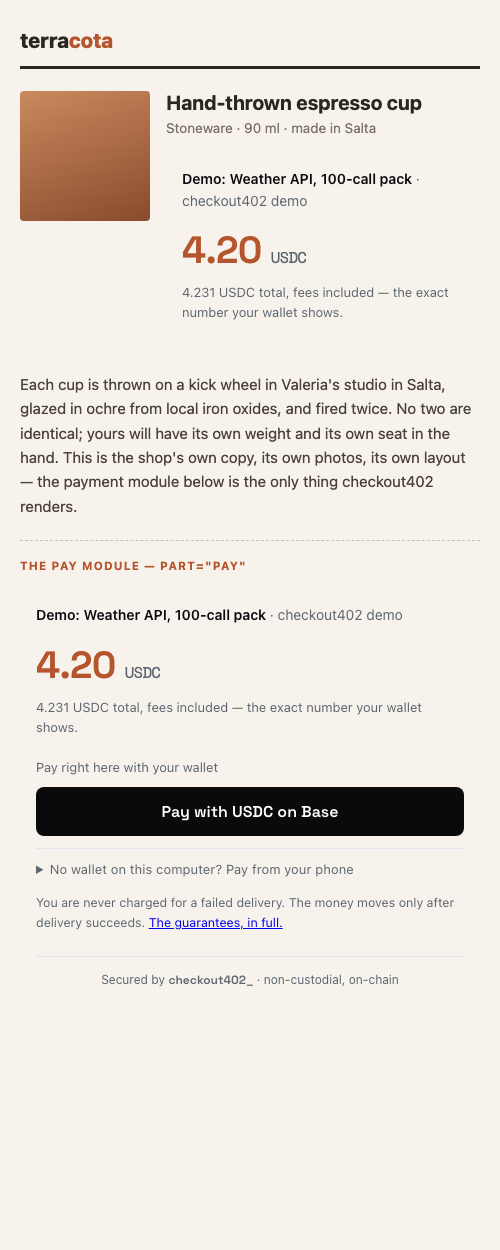
A page that renders the product itself takes only the modules it needs. Every part composes with the theme, accent, format, radius and font knobs:
| part | what mounts |
|---|---|
pay |
the whole action module: identity line, price, every payment surface, secured footer |
wallet |
the desktop till alone — the in-page wallet buttons |
qr |
the phone surface alone: the QR arrives already armed — no fold, no click — and the frame announces the payment the moment the phone settles |
agent |
the agent link block — the x402 URL, stated for handing to a buyer's agent |
price |
a display-only price tag (fees-included total under it) |
Mount several surfaces of the same checkout and they behave as one:
<div data-mw="chk_…" data-mw-part="wallet" data-mw-theme="light"></div>
<div data-mw="chk_…" data-mw-part="qr"     data-mw-theme="light"></div>
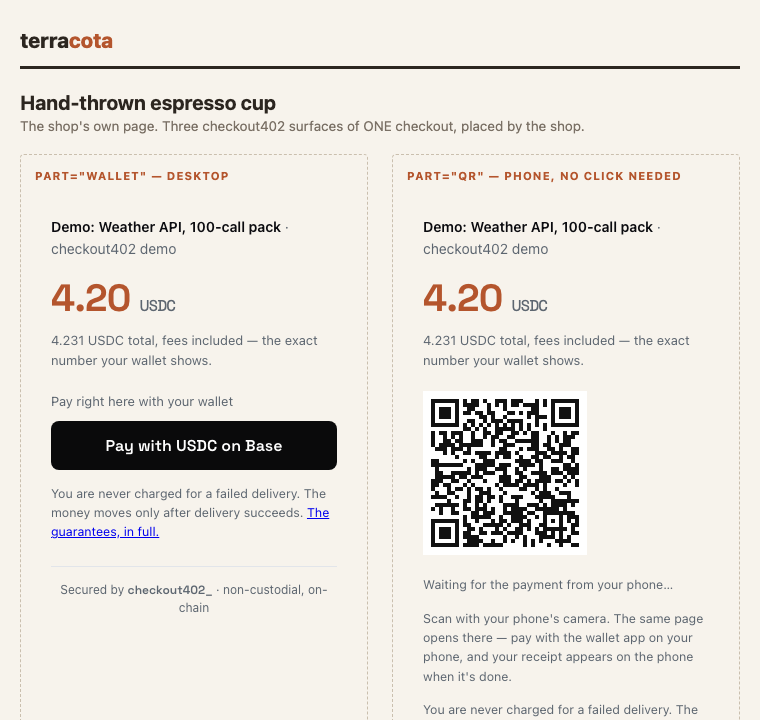
When any surface settles — the phone scans the QR, the desktop wallet
pays, an agent pays the URL — every sibling frame of that checkout
flips to paid and stops offering to take money, and your page hears a
single mw:paid (or mw:held) event, exactly as with one frame.
Two rules hold the composition together:
- The money-truth rule. Display parts may live anywhere; every part that can induce a payment carries the product's name and its fees-included total inside its own frame. Your page can position our pay surfaces, but it can never seat them beside a different price or a different product — the frame states what it sells.
- The fallback rule. Put a plain link inside the mount div:
<div data-mw="chk_…" data-mw-part="pay">
  <a href="https://api.mechawallet.com/c/chk_…">Buy — USDC over x402</a>
</div>
embed.js replaces it when it mounts the frame. Agents and no-JS readers see the anchor — your page is agent-buyable by construction, because the payable URL is in your HTML, not behind our script.
The knobs are a curated set on purpose — free-form CSS inside the frame would let a page restyle the total or hide the TEST chip, and the frame's whole value is that its contents are provably ours. Framed, the card also yields its masthead to the product and signs "Secured by mechawallet_" in the footer instead. Declare nothing and it renders exactly as it always has.
The frame auto-sizes to its content; data-mw-height sets its minimum
height before the first resize arrives (default 520px).
The same script embeds receipts — the after-sale half:
<div data-mw-receipt="pay_…"></div> puts the buyer's receipt (and, on an
escrow sale, their pause/approve/dispute controls) inside your own order
page. The payment id arrives in your checkout.paid webhook and in the
mw:paid/mw:held events; the same origin allowlist governs it.
Want zero setup instead? Button mode renders a Buy button that links to the checkout — a link, not a frame, so it needs no allowlist and no wallet_button and works the moment it is pasted:
<div data-mw="chk_abc123" data-mw-mode="button"
     data-mw-label="Buy Pro — $12"></div>
And for surfaces that are not web pages at all — invoices, packaging,
posters, a slide — every checkout serves its own QR code as a stable
image at {checkout_url}/qr.svg (test face: …/test/qr.svg). Print it
anywhere; a phone camera opens the checkout and the wallet app takes it from
there. The pay page itself shows the same QR to desktop buyers with no
wallet extension ("Pay from your phone").
The dashboard's snippet generator produces the frame and button flavours. Your page
hears the outcome as DOM events — credit a sale on mw:paid only
(mw:held is escrowed money that can still refund). Add
data-mw-test="true" while you build. Full event table:
Escrow → Embedding.
What a machine sees#
The JSON-LD is a schema.org ItemList of Products, each with an Offer
carrying price, priceCurrency and the checkout URL. A package also carries
eligibleQuantity — otherwise $25 for 500 calls reads as $25 per call.
Three ways in, in increasing order of effort for the reader:
https://your-domain/.well-known/mechawallet |
one fetch, no parsing |
| the JSON-LD in your page | one fetch, one JSON parse |
https://api.mechawallet.com/v1/sellers/<slug>/offers |
the full catalogue |
Only armed checkouts appear#
Unarmed checkouts — those still rehearsing on their bare URL — are excluded. A public catalogue is a commercial claim, and listing something that moves no money is a lie told to whoever reads it — including an agent deciding whether to buy.
Update your page when you add offers. The block is a snapshot, not a feed; if
you would rather it stay current on its own, render it server-side from
/v1/sellers/<slug>/offers, which is public and needs no key.